How to add login and registration pages to your Google Sites Website
Unfortunately you can't use AuthPro protection code to simply 'lock' your pages, but you can still add login form to your Google Site to send members to hidden page of your website. You may also want to add registration form for new members so they can create an account and access your hidden pages. If you do not have an AuthPro account, you can sign up here.
Step 1: Add login form to your Google Site

Embedded Login form will have links to 'Registration' and 'Password reminder' pages by default, but if you want to add them on separate page in your Google Site, you can embed them same way as login form.
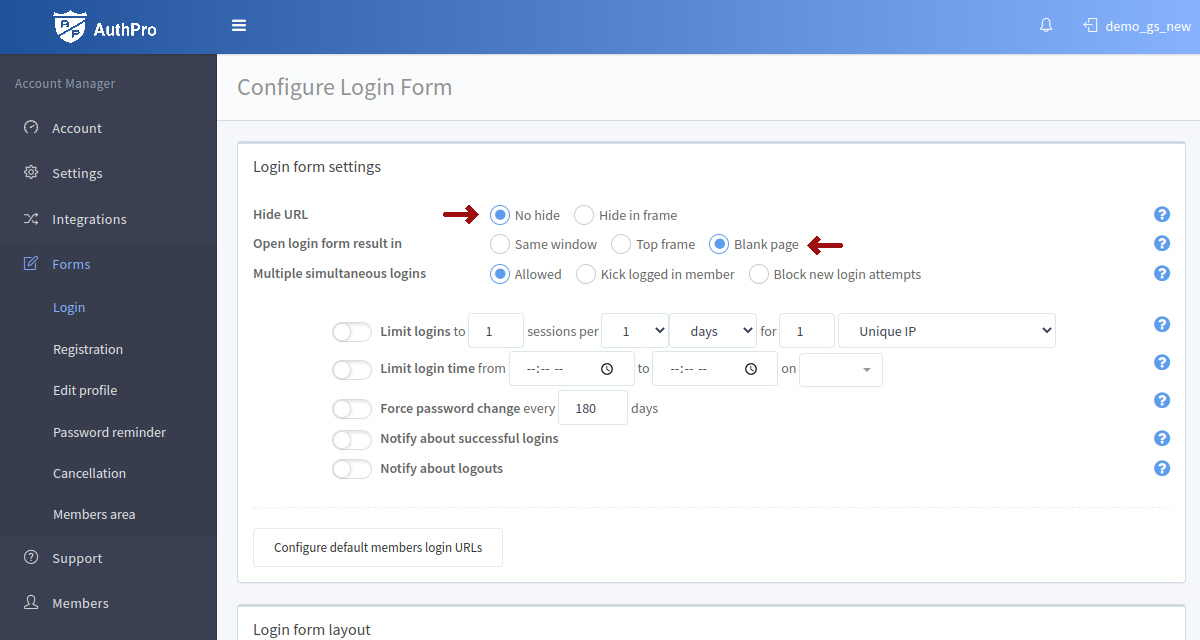
If you're linking to hosted login form instead of embedding it to Google Sites, please make sure 'Hide URL' option is set to 'No hide' and 'Open login form result' is set to 'Top frame' or 'Blank page' in your AuthPro account login settings to avoid members page load issues (Google Sites does not allow embedding it's website content within a frame).
Step 2: Create hidden page on your Google Site

Step 3: Configure members area URL in your AuthPro account

Check our Demo website for example of adding AuthPro login system to Google Sites:
View demo website
Watch demo video
Protecting members only content
Please contact us if you have any questions.